Unified Configuration and Management of Galaxy Devices
Introduction
Multi-Device Experience
Discoverability
Context Aware Solution
Increased galaxy ecosystem users by 6.7% globally through Connected Devices, a solution for unified setup experience for all things ecosystem.
Organisation
: Samsung Research & Development Institute
Project Year
: 2021-22
Project Duration
: 10 months
Position
: Senior Designer, IoT & Wearables
Team Involved
: IoT & Wearables, On-Device AI, Multi-Device Experience
Total members
: ~30

Scope
Samsung has a wide range of devices & appliances under Multi-Device Intelligence. The landscape needs to have clear demarcation of where the problem lies and what needs to be solved.
Two major teams: While one team focused on Smart Things & IoT related experiences, the other hyper-focused on productivity oriented Galaxy Ecosystem, with a feature-to-feature mapping with Apple. This project deals with the later, while closely collaborating with the former.

Team 1: Smart Things & IoT Ecosystem
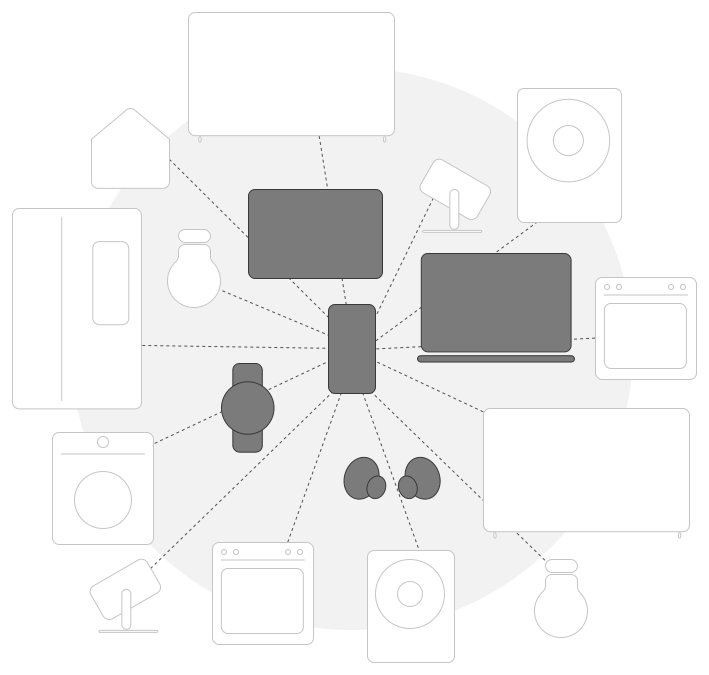
Team 2: Galaxy Ecosystem (Scope)

In Action of Mapping out User Flow for seeking answers
What are we trying to solve?
Objective is to improve Ecosystem Adoption to 50% to match with iOS, by Q4 2022.
Study shows that ecosystem users have 99% retention rate. But, for galaxy ecosystem, active devices were only ~10% as opposed to ~50% in Apple, in 2021. The missed opportunity is the trigger for this project.
It aims to identifying the underlying deeper issues and provide pragmatic solutions with minimum design possible for a whopping ~900 M userbase.


Internal Usability Testing

Affinity Teamwork

Making Sense of Usability Results
Customer Sentiment, a Rebuttal
Most Samsung users cannot afford an ecosystem in the first place, and Samsung does not produce enough flagships seeing its audience. Is this another Chicken & Egg story?
Compared to brand loyal Apple users, Samsung users were budget loyal and indifferent towards an ecosystem. It was found that the higher the price of a phone, the more tech savvy the customers are. Unfortunately, Samsung sold budget phones 5 times more than the flagship phones.


Average Samsung User

A significant chunk of Samsung userbase are budget phone users with no intent of spending for an ecosystem.
Budget Friendly
Tech-Illiterate
Basic Phone Needs

Average Apple User

iPhone is perceived as a premium product with users having capacity & willingness to afford an ecosystem.
Content Creator
Tech-Savvy
Brand Loyal
Understanding the Ecosystem
14 Ecosystem Features bucketed into 4 Categories as per the Galaxy Ecosystem Framework, as of 2021.
Before delving deep, we listed out Samsung Galaxy Ecosystem's 14 unique features working across 5 different productivity devices categorised into 4 major pillars, namely, Setup & Configure, Transfer, Continue, Control & Collaborate, in the year 2021.
List of 14 Features and iOS counterparts:
Pillar
Feature
Description
iOS Counterpart
Setup & Configure
Easy Pair
Auto detection & pairing of Smart Watch & Buds to Phone or Tablet.
Instant Setup
Setup & Configure
Auto-Connect
Intelligent switching of Buds between Phone & Tablet.
Auto-Switch
Transfer
Quick Share
Share files with own or other devices.
Airdrop
Transfer
Copy Paste
Copy in one device, paste in other device.
Handoff
Continue
Call & Text on Other Devices
Receive or make calls as well as text messages from Phone, Tablet, Smart Watch, or Galaxybook.
Call Continuity, Message Continuity
Continue
Continue Apps on Other Devices
Continue ongoing calls, & browsing in Samsung Internet from Phone to Tablet & vice versa.
Handoff
Continue
Smart View
Play videos from Phone or Tablet to TV
AirPlay
Continue
Video Call Continuity
Allows user to continue video calls between Phone & Tablet using TP Google Duo.
Facetime
Control & Collaborate
Auto-Hotspot
Remotely turn on hotspot of one Samsung device from the other.
Instant Hotspot
Control & Collaborate
Samsung Dex
Allow user to use phone apps in a desktop like environment by projecting it to a TV.
-
Control & Collaborate
Second Screen
Tablet works as an extended display for Laptop when positioned next to it.
Sidecar
Control & Collaborate
Link to Windows
Allow Galaxy OS to connect with Windows.
-
Control & Collaborate
Smart Lock
Use Smart Watch to unlock your phone.
Auto Unlock
Control & Collaborate
Music Share
Guest can play music in a BT speaker through hosts phone without pairing.
Airplay

Documentation
Created a centralized spreadsheet to track ecosystem features and user testing results.

Master Sheet for Documenting all Ecosystem Feature Testing of Samsung & Apple
Four Key Insights
👉🏾 Advanced vs default experience
👉🏾 Lack of Awareness
👉🏾 Weak Nucleus
👉🏾 Fragmented Setup
Insight 1 / 4
Competition Benchmarking
Internal Usability Testing
Advanced vs default experience
Summary of Insight
Ecosystem features are not seamless to set up. One needs to be a tech savvy to be able to configure them.
Despite having an active ecosystem, features were not active by default. They need to be configured on each device separately. Set it up on Phone settings, then set it up on Tablet settings, and so on. Moreover, 'Advanced features’ which housed all ecosystem features increased perceived complexity and discouraged exploration as they seemed too techy to the lay users, the majority.

Review & Alignment
Buried Features
Core Continuity Features are buried OR require deep familiarity with platform. Moreover, all the features are OFF by default unlike iOS. They are labelled as "Advanced Features" adding perceived complexity. Applies to Features like App Continuity, Call Continuity, Text Continuity, and Samsung Dex.
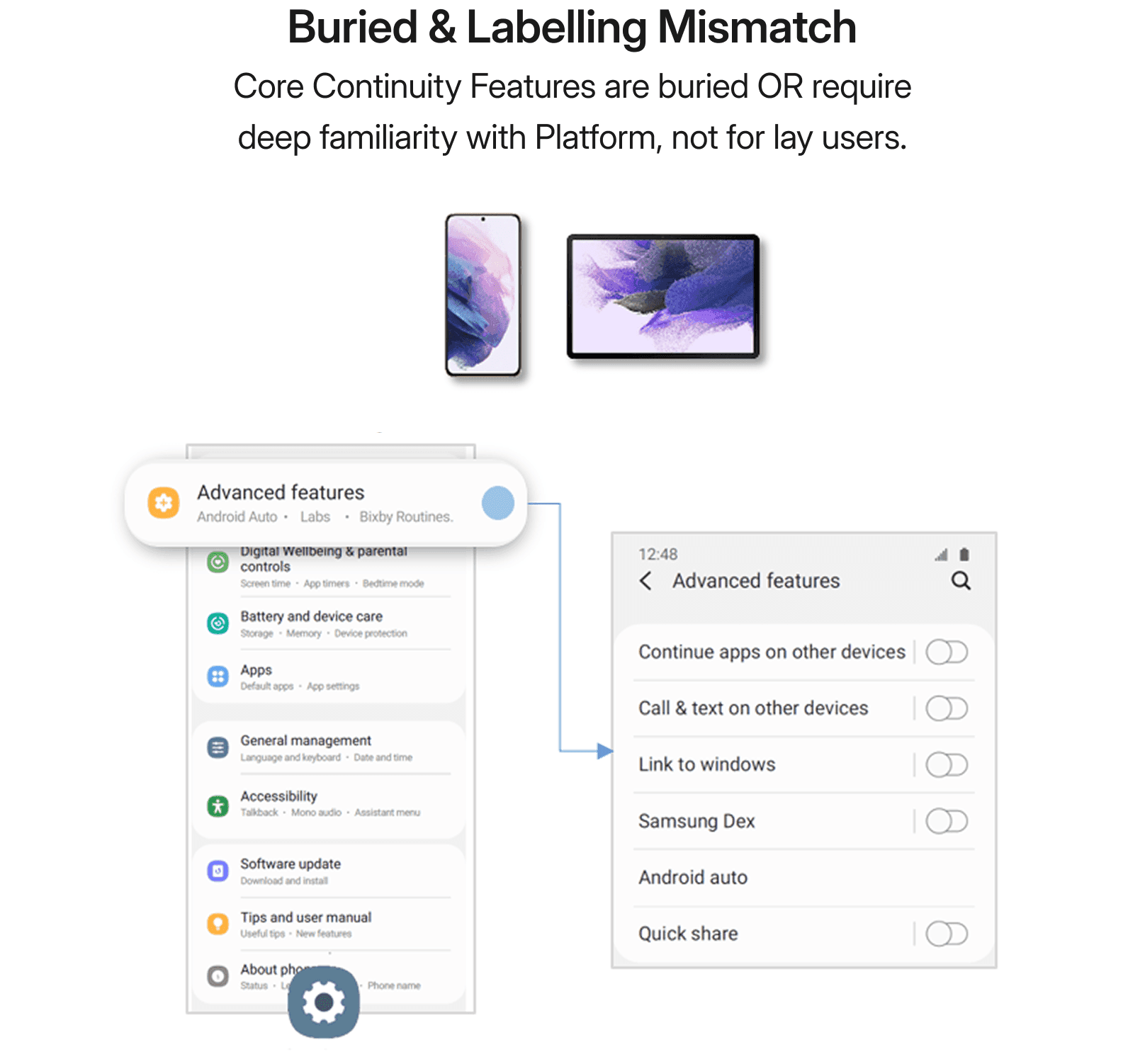

Numerous Steps for One Feature
Too many steps to configure a feature is a lot manual questioning the device's intelligence. Such experience leads to massive drop off by power users, let alone the majority lay users. This is evident in features like Nearby Unlock, Second Screen, and Link to Windows.


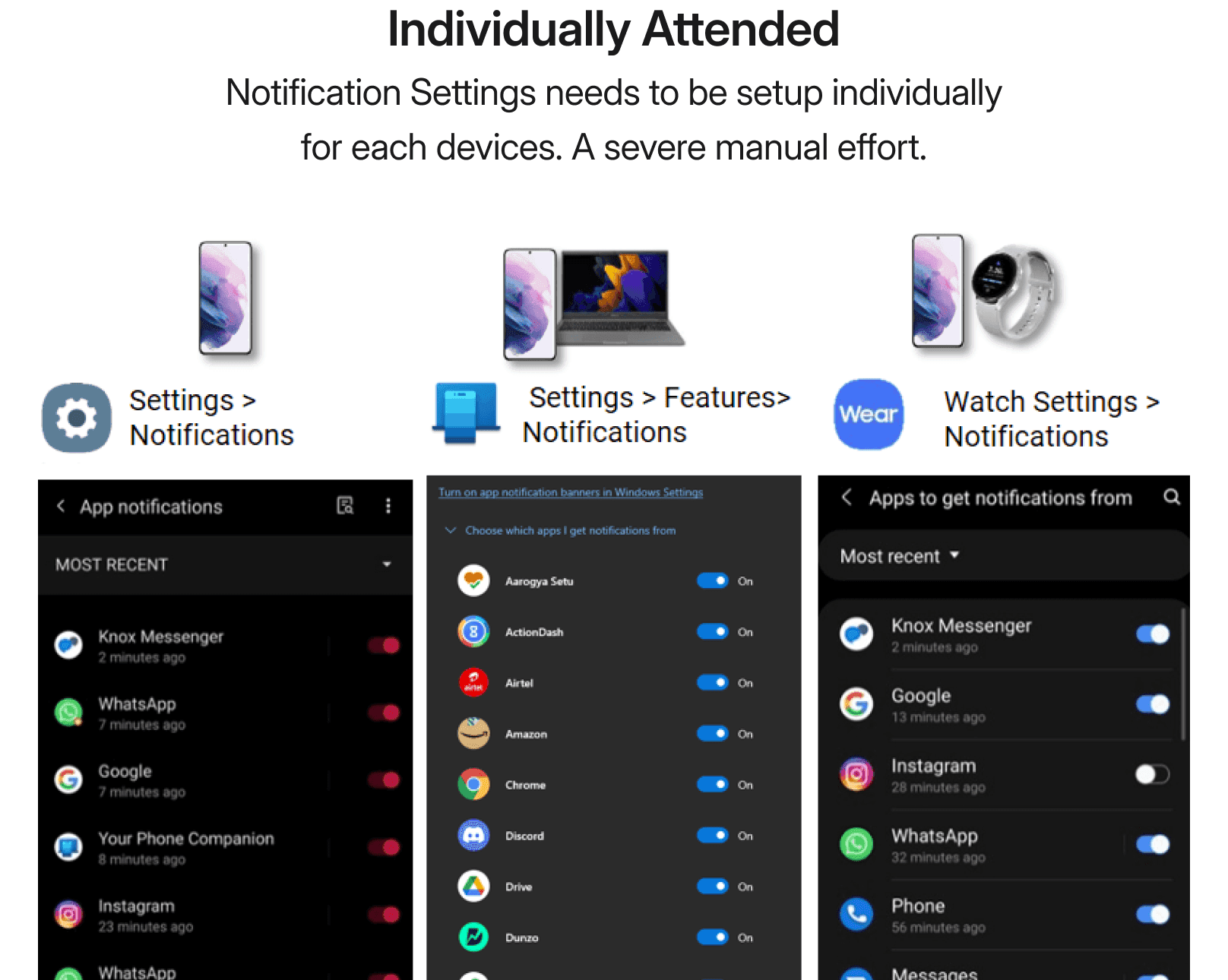
Manual Effort
Unlike iOS's Focus Mode in Notifications which can be enabled just by one action, Samsung Notification Settings need to configured in different devices by attending them individually. This applies to features like Second Screen, Call Continuity, Text Continuity, App Continuity, Copy Paste, and Link to Windows.

Insight 2 / 4
User Research
Retail Experience
Competition Benchmarking
Lack of Awareness
Summary of Insight
Ecosystem is not on top of mind of customers. Most interviewed customers lacked knowledge & interest when asked about Ecosystem.
Samsung Customers intent is to purchase a robust and long lasting phone with top notch hardware capabilities. Samsung Account, Samsung Apps, and Samsung Software capabilities are not on top their mind. Below are the some VOCs from customer research.
Voice of customers
"Samsung has an ecosystem?"
"Sorry I could not locate the Call Continuity feature you asked for"
"I have never come across Quick Share, I use WhatsApp to share photos with my close ones"
"No, I don't have any idea what Samsung Account is for"
"I have an Iphone and a Samsung Phone. I know Airdrop but not Quick Share"
"What is ecosystem? What is it?"
"To be familiar with it, I have to own at least a Tablet or a Smart Watch to play with, which I don't"
"I would not spend something on this"

User Interaction at Samsung Opera House

User Testing

Observing Users Experiencing Ecosystem
Insight 3 / 4
Competition Benchmarking
Internal Usability Testing
Weak Nucleus
Summary of Insight
Samsung Account and Samsung Cloud are less deeply integrated into the ecosystem than Apple ID and iCloud, resulting in a weaker ecosystem anchor.
Samsung Cloud (One Drive), and iCloud are instrumental in connecting Apps & Services across devices in their respective ecosystems. Both works with their enablers Samsung Account + Microsoft Account (One Drive) for Samsung, and Apple ID for iOS. However, Samsung Account's registration is extremely low, and Samsung Cloud is underutilised.


Insight 4 / 4
Competition Benchmarking
Internal Usability Testing
Fragmented Setup
Summary of Insight
Samsung's open philosophy invites OS constraints unlike Apple's Closed Garden, leading to dispersed touchpoints.
The Touch-points for Setting up Ecosystem Features are spread all over Samsung Settings (OneUI Android), WearOS App (Google), Your Phone App (Microsoft), Bluetooth Settings, and Notification Panel. They are dispersed unlike the unified experience of System Preferences in iOS.


Team Discussion

Conversation with Store Executives

Ecosystem at Experience Center


Inconsistent Backend Tech
Backend Tech is not in sync with Ecosystem by default and vary from feature to feature.
Bluetooth Low Energy (BLE), WiFi Direct, WiFi AP, WiFi Aware, and Internet or Data are used in the backend that run the ecosystem features. Unlike Apple Wireless Direct Link (AWDL), these tech are inconsistent from feature to feature.
For example, to turn ON call continuity, user will have to make sure that both devices are connected to WiFi, has Samsung Account signed in, and the Bluetooth ON. Failing to meet any of these conditions will result into failure of Call Continuity Setup.


Multiple Enablers
Any ecosystem feature to work in Galaxybook & use Gallery Sync through One Drive, Microsoft Account sign in is a must in addition to Samsung Account. Unlike Apple ID as one enabler, Samsung depends on Microsoft Account in addition to Samsung Account.


How Might We
Strategy
Two Pronged Strategies
How Might We's
Four Key Insights 👉🏾 How Might We?
Advanced vs default experience 👉🏾 HMW make setup seamless & intuitive?
Lack of Awareness 👉🏾 HMW improve feature discovery?
Weak Nucleus 👉🏾 HMW strengthen Samsung Account?
Fragmented Setup 👉🏾 HMW unify setup experience?
The abstraction of the how might we's points to the following Two Pronged Strategies of Configuration & Consumption Experience.
Strategy 1

Configuration Experience (Scope)
Unified Configuration and Management of Galaxy Devices
How seamless & intuitive it is to configure an ecosystem feature in various phases of device lifecycle.
Strategy 2

Consumption Experience
Deeper Galaxy Cross-Device Experiences with Consistency
How empowered users feel by using the ecosystem feature and does it add real value.
Configuration Experience (Scope)
Unified Configuration and Management of Galaxy Devices
Setup & Configure
Transfer
Continue
Control & Collaborate
Focus Area 1 (Commercialised 🚀)
Unified Galaxy Settings
Singular place to manage configuration
Focus Area 2 (Concept ✏️)

Onboarding
Initiate into the Galaxy Ecosystem
Focus Area 3 (Commercialised 🚀)

Galaxy Nucleus
Holding the ecosystem together
Unified Galaxy Settings
Increased galaxy ecosystem users by 6.7% globally by launching Unified Galaxy Settings, later named as "Connected Devices", a solution for centralised, seamless & intuitive setup experience for all ecosystem features consistent across all devices.
"Connected Devices" includes all Device-to-Device & Ecosystem Features which are pulled out of Advanced Features to place them inside a dedicated place for all things ecosystem. It is launched as part of One UI 5.3 Software Update in Sep, 2022 catering to ~900 M users. Phase 1 is launched for Phone & Tab for having the same OS.
Auto-Sync
ON by Default
Information Architecture Hygiene
Proximity Trigger
Before
Advanced Features

After
Connected Devices + Advanced Features

Before
Advanced Features = Dumpyard
Advanced Features was treated as a dumpyard for features which did not had any dedicated folder to place. They include core continuity features, device-to-device, motions & gestures, android auto, and many more.

After
Connected Devices & Advanced Features
Connected Devices provides a dedicated & unified place for all continuity features and device-to-device MDE features, separated from mixing with other Advanced features.

Real Time Syncing of Switchers/Toggles
Once, Samsung Account is signed in, the Phone should be able to call the shots for Tablet and vice versa instead of individually attending each device to toggle the settings ON or OFF.

ON by default
Default screen for Connected Devices showcasing Ecosystem features ON by default.

Call & Text Continuity
Mobile is inert to unknown tablet's BLE beaconing as Samsung Account is not same.

Call & Text Continuity
BLE beacon identified familiar tablet with same Samsung Account in proximity.

Call on other devices
In the presence of a familiar tab, the settings turn ON by default without any user intervention.


Summary of Concept
Launched for mobile & tablet as part of OneUI 5.3 update targeting an audience of 900M that increased Ecosystem Users by a 6.7% globally.
Fragmented 👉🏾 Centralised.
Dispersed & Chaotic 👉🏾 Consistent across devices.
Techy Label 👉🏾 Semantic Label.
OFF by Default 👉🏾 ON by Default.
Individual attention 👉🏾 Real-time syncing across devices.
Before
Advanced Features
Mix of various categories of features

Proposed
Unified Galaxy Settings
Proposal of a Centralised Ecosystem

Commercialised
Connected Devices
Centralised Ecosystem + D2D MDE

Onboarding
The Concepts revolve around automatically enabling relationships between devices with continuation of personalisation and preferences.
Proposed multiple concepts with tech-feasibility check in collaboration with Tech team & PM Team. These concepts are later nurtured through detailing and phasing them out in HQ, Suwon, South Korea.
OOBE Prompt
Intelligent prompt of features on pairing a new device to the existing ecosystem during Out Of Box Experience (OOBE). For example, Smart Lock and Call & Text continuity can be pushed to Smart Watch during OOBE.

Proximity Calm Prompt
Feature that activates in proximity is calmly prompted in the devices, thus improving visibility. For example, Second Screen Feature automatically appears on Tablet when a Galaxybook is nearby without being intrusive.

Contextual Nudge
In-use contextual nudge of features on devices which are relevant at a particular context. For example, when Microsoft Powerpoint is run on Galaxybook, PPT Controller feature gets prompted on the Smart Watch.

Galaxy Nucleus
Samsung Account Registration increased by 11.8% globally through multiple solutions based on user research conducted in collaboration with an external research agency.
Picked up as a separate project in the year 2022, the objective was to increase Samsung Account cumulative sign-up rate to 80% globally by 2023. Lower sign up had direct influence on discovery of ecosystem features.
Signup Workflow
Redesigned Signup workflow leading to CTR of 18%

Samsung Account Touchpoint
Redesigned touchpoint in settings for better visibility.

Push notifications, Software update, App-based nudges, and Value Communication were accepted and launched leading to 11.8% increase in signup rate globally. View full case study here.
Consumption Experience
Deeper Galaxy Cross-Device Experiences with Consistency
(Next Phase)
Setup & Configure
Transfer
Continue
Control & Collaborate
Omni Experience of Copy-Paste
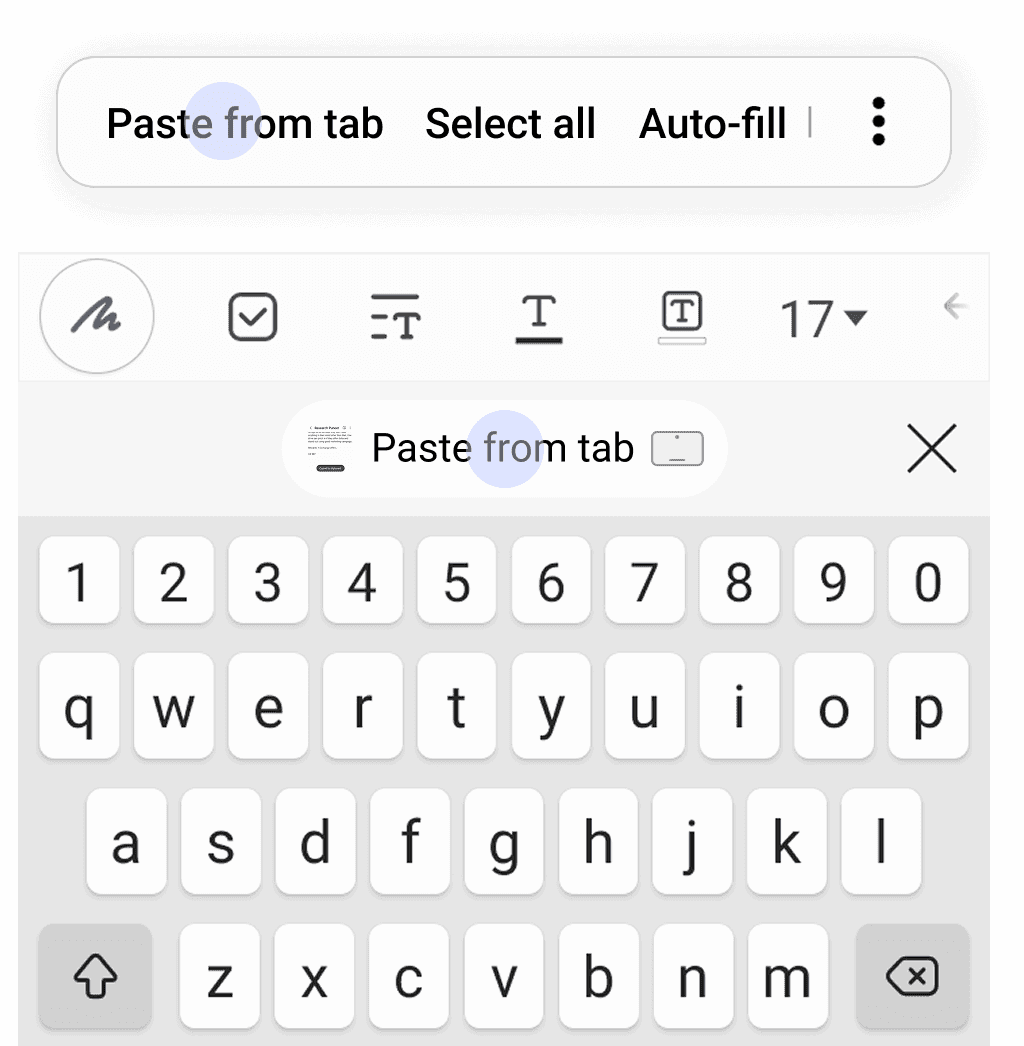
Copy-Paste feature in production is not exhaustive as iOS. It works for only 3 file types, text, image, and code unlike iOS that allows 9 different file types. Second, the feature is active between Phone & Tab unlike iOS that works across all devices in the ecosystem. Here is the glimpse of the project which I exited while it was ongoing.
AS IS
Only Phone & Tab

AS IS
Only 3 File Types

TO BE
All Ecosystem Devices

TO BE
9 File Types


AS IS
"Paste" from both Clipboard & Keyboard is agnostic of ecosystem's presence

TO BE
"Paste from tab" in Clipboard & Keyboard educate users of ecosystem's presence

Summary
Setup & Configure
Transfer
Continue
Control & Collaborate
Summary of all recommendations
Strategy
Concept
Proposed Feature
Status
Results
Unified Configuration and Management of Galaxy Devices
Unified Galaxy Settings
Consistent across devices
Launched
6.7% global increase in ecosystem users
Setup & Configure
Setup & Configure
ON by default
Launched
Auto-Switch
Setup & Configure
Setup & Configure
Auto-sync switchers / toggles
Launched
Airdrop
Setup & Configure
Setup & Configure
Account enabling
Launched
Airdrop
Setup & Configure
Setup & Configure
Proximity trigger
Launched
Handoff
Setup & Configure
Onboarding
OOBE Prompt
In Review
--
Continue
Setup & Configure
Proximity Calm Prompt
In Review
3.6%
Continue
Setup & Configure
Contextual Nudges
In Review
3.6%
Setup & Configure
Galaxy Nucleus
Signup Workflow
Launched
12% increase in Samsung Account Registration (Separate Project)
Setup & Configure
Galaxy Nucleus
Push Notifications
Launched
3.6%
Setup & Configure
Galaxy Nucleus
Software updated
Launched
3.6%
Setup & Configure
Galaxy Nucleus
Value Communication
Launched
3.6%
Setup & Configure
Galaxy Nucleus
App-based nudges
Launched
3.6%
Deeper Galaxy Cross-Device Experiences with Consistency
Consumption experience
All ecosystem features
Next Phases
--
Learnings
Brief exits for a reason. Question it.
Spend 80% of time with the problem.
Products of a company tells something about the organisation structure.
Go extra mile to advocate for user
A Product's success has three pillars, Awareness, Experience, & Value.
Thank You
Arnav Bhagawati
Staff Product Designer at Originality.ai, based out of Toronto.

Home
Projects
About
Behance
Medium