
Multi-device experience
Platform UX
One UI 5.3
Manage Galaxy Devices through Unified Settings
A unified place for discovering, configuring, and managing the experiences that make ecosystem devices more useful together.
+6.7%
1 B+
3
Executive Summary
Owning connected devices should not require understanding how to connect them. At Samsung, I shaped the setup experience through Connected Devices, bringing fragmented Galaxy ecosystem features into a dedicated settings destination.
Situation
Galaxy ecosystem active devices were only ~10% as opposed to ~50% in Apple, in 2021. Apple had significantly higher ecosystem adoption compared to Samsung.
Task
Identify reason behind low adoption of galaxy ecosystem. Is it because customers do not have confidence in Samsung ecosystem? or, is the configuration clumsy?
Action
Tested all ecosystem features, competition study, led moderated usability testing, synthesised problem framing, proposed solutions, influenced roadmap & execution startegy.
Results
Shipped "Connected Devices" globally, followed by an increase of ecosystem feature usage by +6.7%.
My role
Senior Designer, IoT & Wearables
Core team
~15 across UX, research, product, engineering and leadership
Extended coalition
Legal, retail, marketing, business development, and product teams across India & South Korea.

Team 1: Smart Things & IoT Ecosystem
Team 2: Galaxy Ecosystem (Scope)
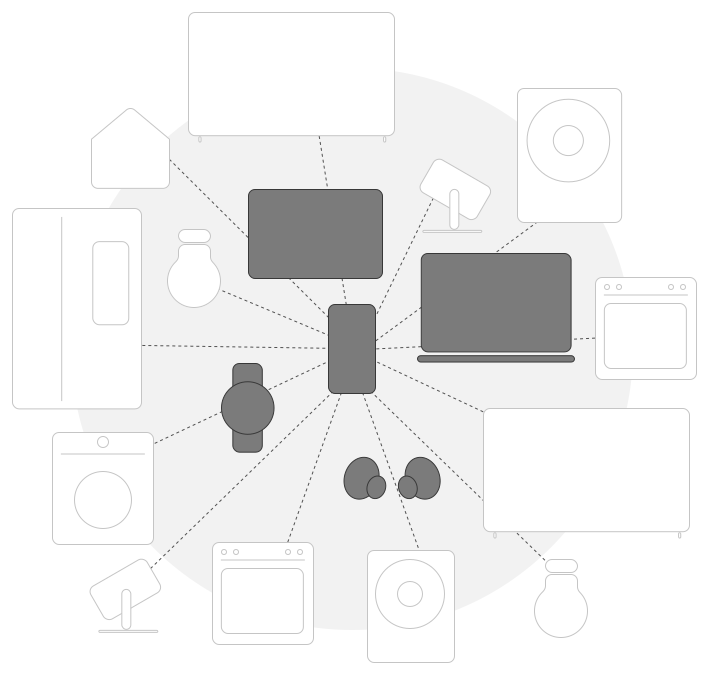
Scope · Galaxy ecosystem · While one team focused on Smart Things & IoT related experiences, our team was hyper-focused on productivity oriented Galaxy Ecosystem, with a feature-to-feature mapping with Apple.
My contributions
I owned, influenced, and delivered.
What I directly owned
Lab testing of all devices, Feature parity comparison, Experience parity comparison, Competition benchmarking, Usability testing, Problem synthesis, Problem reframing, Ideation.
What I influenced
Influenced roadmap, cross-surface adoption strategy, global translation of ideas and alignment between Bengaluru & Samsung HQ in Suwon.
What partner teams delivered
Production UI refinement, engineering implementation, analytics instrumentation, policy review and rollout through One UI release trains.


Feature testing · ideation · thematic analysis · impact effort matrix
BEFORE
Advanced Features

AFTER
Connected Devices & Advanced Features

CONNECTED DEVICES
SHIPPED ONE UI 5.3
👉🏾
Case study in one sentence
I proposed solutions & influenced leadership decisions to improve setup experience of ecosystem features by addressing discoverability issues, debts, and weak foundation.
02 The problem
Ecosystem that's not on top of customer's mind.
Galaxy ecosystem devices were only ~10% as opposed to ~50% in Apple, in 2021, despite 99% retention rate of ecosystem users as per analytics, a missed opportunity for Samsung.
10%
Devices with active ecosystem

99%
User retention with ecosystem
Organisation not leveraging on strength.
WHY LEADERSHIP CARED
Low adoption
Low adoption of ecosystem despite growing sales volume was a concern for the leadership.
Retention
Samsung was not leveraging on the strong retention of ecosystem.
Competition
Apple had already 50% active devices, 5 times more than Samsung.
💬
Adoption of galaxy ecosystem should reach 50% by end of 2022 to compete iOS.
Dipesh Shah
Managing Director
Samsung R&D Institute, Bangalore
CONSTRAINTS
Open platform
Unlike Apple's closed garden, Samsung was not consistent in terms of ecosystem as it had an open platform concept to connect with other brands.
Low-intent
Majority Samsung customers owned budget phones, and showed no interest in owning an ecosystem.
Scale
Any update in workflow had to work across markets, devices, services and One UI release trains, NOT one local independent adoption funnel.
Independent teams
Every ecosystem feature had independent teams with set OKRs & roadmaps.
🔍
Problem reframe
How might we contextually surface ecosystem capabilities and make setup intuitive?
03 What we learned
Samsung caters to a majority tech illiterate audience.
Affinity towards an ecosystem has a direct correlation with the phone's budget. Higher the price, higher the tech savviness, higher the affinity towards an ecosystem. Unfortunately, Samsung sold budget phones 5 times more than the flagship phones. On the other hand, Apple devices are already priced at premium segment leading tech literate customers to own them.

Diagram maps our research findings how phone's budget is directly proportional to inclination towards an ecosystem. Not only that users cannot afford multiple devices at once, but also the intent to enquire about ecosystem features is extremely low.
01 · Analytics
Used Samsung Analytics to understand ecosystem feature usage across multiple devices.
02 · Feature combinations
Tested 14 features among 5 galaxy devices, and benchmarked against Apple's 5 devices.
03 · Field study
10 moderated interviews, 10 telephonic interviews, 1 survey, 2 competitor OEMs.
04 · My leadership
I aligned stakeholders through presentation & communication of evidence backed solutions and translated them into actionable roadmap decisions.
01
Dispersed & chaotic
Fragmented setup experience across multiple OS & devices.
02
Lack of intent
Average Samsung user is budget loyal with limited tech literacy.
03
Advanced vs default
Only a tech savvy individual can understand Samsung.
04
Lack of binding force
No centralised nucleus holding the ecosystem together.
THE TURNING POINT
The brief asked me to increase ecosystem adoption.
MY REFRAME
“How might we let users discover & set up the ecosystem seamlessly?"
I used that question as a framework to go beyond designing onboarding flow to investigating entire lifecycle, and to bring the independent surface owners into one page.
04 Dispersed & chaotic
Settings are spread all over
The touch-points for setting up ecosystem features are spread all over Settings app (OneUI Android), WearOS App (Google), Your Phone App (Microsoft), device bluetooth settings, and notification panel. They are dispersed unlike the unified experience of System Preferences in iOS. Samsung's open philosophy invites OS constraints unlike Apple's Closed Garden, leading to dispersed and chaotic touch-points.
Different setup for the same feature

Inconsistency in the technical pre-requisites

Insight · DISPERSED & CHAOTIC


Insight · DISPERSED & CHAOTIC


Insight · DISPERSED & CHAOTIC


Insight · DISPERSED & CHAOTIC
05 Lack of intent
Most interviewed users didn't care about galaxy ecosystem.
Ecosystem is not on top of mind of customers. Most interviewed customers lacked knowledge & interest when asked about ecosystem. Primary intent is to purchase a robust and long lasting phone with top notch hardware capabilities.


Insight · LACK OF INTENT
06 Advanced vs default
One needs to be tech savvy to understand ecosystem.
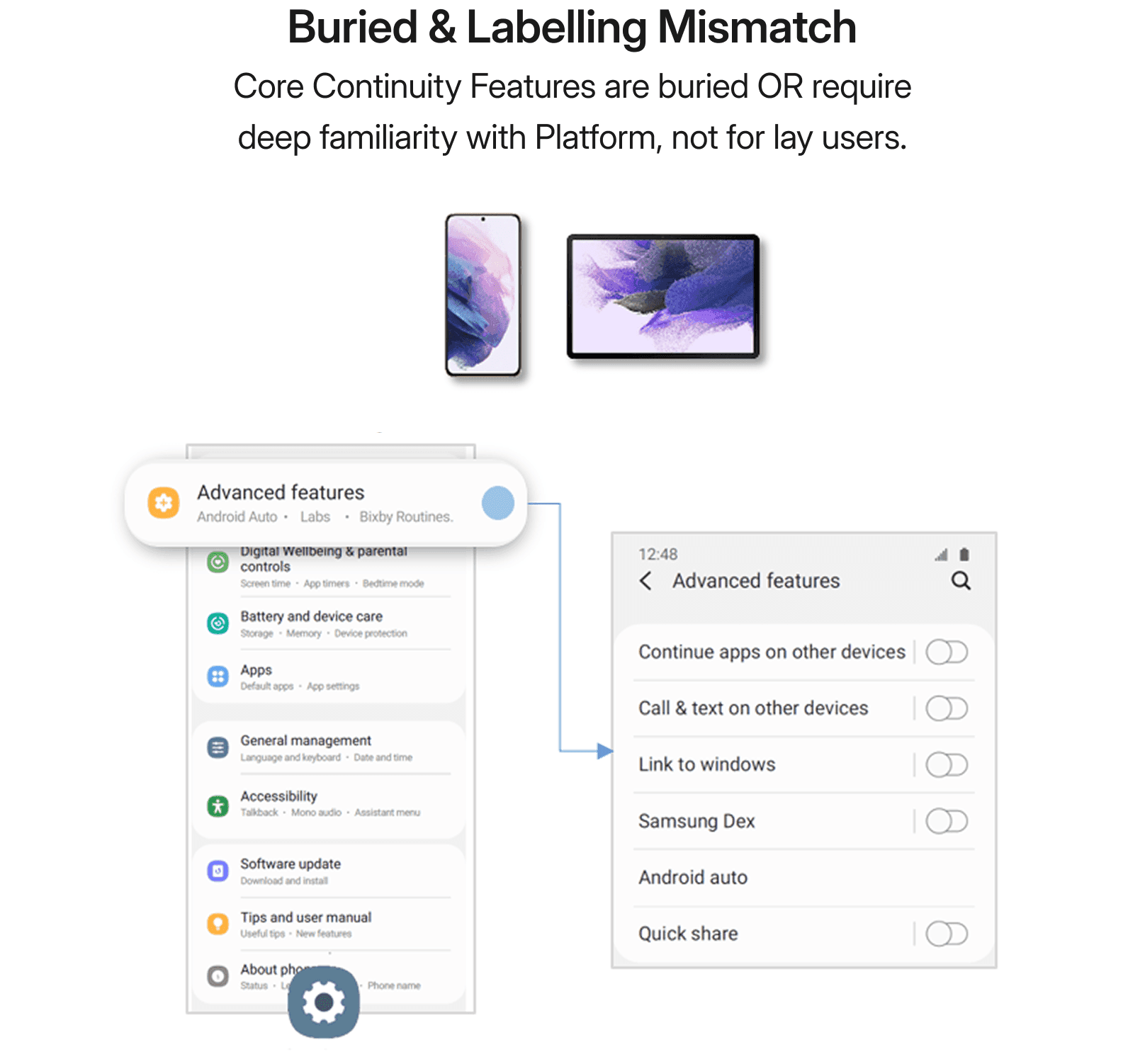
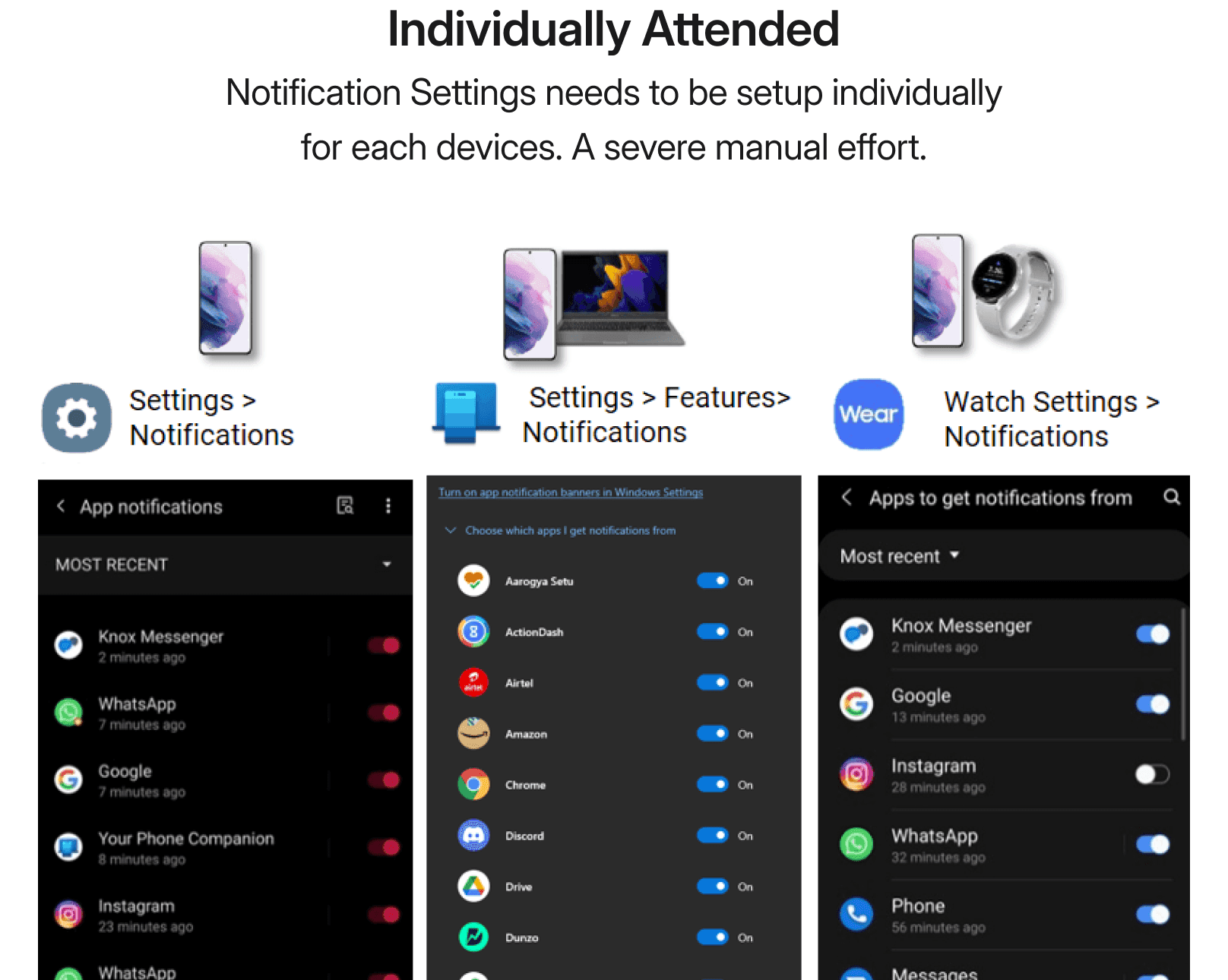
Ecosystem features are not seamless to set up. One needs to be a tech savvy to be able to configure them. Despite having an active ecosystem, features were not active by default. They need to be configured on each device separately. Set it up on phone, then on tablet, and so on. Moreover, 'Advanced features’ which stored all ecosystem features had perceived complexity and discouraged exploration as they seemed too techy to the lay users.

Insight · ADVANCED VS DEFAULT


Insight · ADVANCED VS DEFAULT

Insight · ADVANCED VS DEFAULT
07 Lack of binding force
Underutilised nucleus.
Samsung account and cloud are less deeply integrated into the ecosystem than Apple ID and iCloud, resulting in a weaker ecosystem anchor. Samsung cloud (One Drive), and iCloud are instrumental in connecting apps & services across devices in their respective ecosystems. Both works with their enablers Samsung Account + Microsoft Account (One Drive) for Samsung, and Apple ID for iOS. However, Samsung account's registration has been stagnant and low compared to Apple ID.

Insight · LACK OF BINDING FORCE


Insight · LACK OF BINDING FORCE
08 The strategy
The two pronged startegies
Make capabilities easy to find. Then reduce the effort required to use them.
STRATEGY 01 · CONFIGURATION · SELECTED

MAKE CAPABILITIES EASY TO FIND & SETUP
Unified Settings and Management of Galaxy Devices
User value
Reach
Effort
Platform risk
LOW
STRATEGY 02 · CONSUMPTION · DEFERRED

REDUCE EFFORT REQUIRED TO USE THEM
Deeper Galaxy Cross-Device Consumption Experiences
User value
Reach
Effort
Platform risk
HIGH
IMPLEMENTATION STRATEGY
NOW
Launch low-hanging low-risk ideas.
NEXT
Double down on high confidence ideas.
LATER
Invest in & validate high effort concepts.
👉🏾
My recommendation
Launch unified settings consistent across all devices followed by investigating low signup rate for Samsung account, and then recommend feature-wise consumption experience.
09 Choosing what shipped
STRATEGY 02 · DEFERRED · HIGH EFFORTS · RESOURCE INTENSIVE
Deeper Galaxy Cross-Device Experiences
Copy-Paste feature in production is not exhaustive as iOS. It works for only 3 file types, text, image, and code unlike iOS that allows 9 different file types. Second, the feature is active between Phone & Tab unlike iOS that works across all devices in the ecosystem. Here is the glimpse of the project which I exited while it was ongoing.
AS IS
Only Phone & Tab

AS IS
Only 3 File Types

TO BE
All Ecosystem Devices

TO BE
9 File Types


AS IS
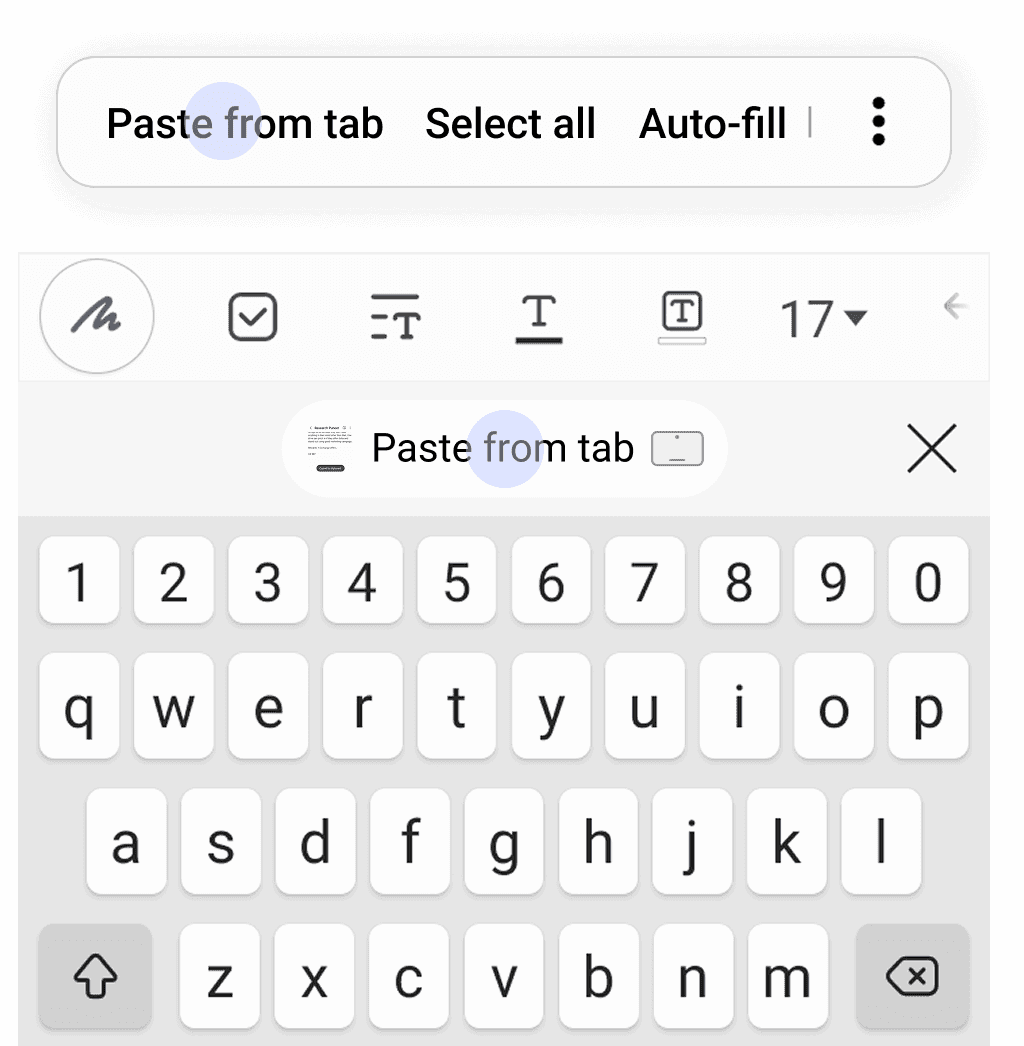
"Paste" from both Clipboard & Keyboard is agnostic of ecosystem's presence

TO BE
"Paste from tab" in Clipboard & Keyboard educate users of ecosystem's presence
LACK OF BINDING FORCE

MASTER RULE TABLE
STRATEGY 01
Unified Settings and Management of Galaxy Devices
How seamless & intuitive it is to configure an ecosystem feature in various phases of device lifecycle.
CONCEPT A · DEFERRED

Onboarding
Initiate into the Galaxy Ecosystem
User value
Reach
Effort
Platform risk
HIGH
CONCEPT B · SHIPPED
Connected devices
User value
Reach
Effort
Platform risk
LOW
CONCEPT C · NEXT

Galaxy nucleus
Holding the ecosystem together
User value
Reach
Effort
Platform risk
LOW
CONCEPTS · How might we make setup seamless & intuitive?
A · ONBOARDING
DEFERRED · High effort · Involvement of hardware capabilities
Initiate into the galaxy ecosystem
The Concepts revolve around automatically enabling relationships between devices with continuation of personalisation and preferences. Proposed multiple concepts with tech-feasibility check in collaboration with Tech team & PM Team. These concepts are later nurtured through detailing and phasing them out in HQ, Suwon, South Korea.
01 · DEFERRED · contextual nudge
When a task creates a need
In-use contextual nudge of features on devices which are relevant at a particular context. For example, when Microsoft Powerpoint is run on Galaxybook, PPT Controller feature gets prompted on the Smart Watch.

02 · DEFERRED · OOBE prompt
When a device joins
Intelligent prompt of features on pairing a new device to the existing ecosystem during Out Of Box Experience (OOBE). For example, Smart Lock and Call & Text continuity can be pushed to Smart Watch during OOBE.


A · ONBOARDING
B · CONNECTED DEVICES
Shipped One UI 5.3
Singular place to manage setup
Increased galaxy ecosystem users by 6.7% globally by launching Unified Galaxy Settings, later named as "Connected Devices", a solution for centralised, seamless & intuitive setup experience for all ecosystem features consistent across all devices. "Connected Devices" includes all Device-to-Device & Ecosystem Features which are pulled out of Advanced Features to place them inside a dedicated place for all things ecosystem. It is launched as part of One UI 5.3 Software Update in Sep, 2022 catering to ~900 M users. Phase 1 is launched for Phone & Tab for having the same OS.
BEFORE
Advanced Features

AFTER
Connected Devices + Advanced Features

CONNECTED DEVICES
BEFORE
Only Advanced Features
Advanced Features was treated as a dumpyard for features which did not had any dedicated folder to place. They include core continuity features, device-to-device, motions & gestures, android auto, and many more.
AFTER
Connected Devices & Advanced Features
Connected Devices provides a dedicated & unified place for all continuity features and device-to-device MDE features, separated from mixing with other Advanced features.
CONNECTED DEVICES
Less repeated configuration · Switch here, auto-switches there

REAL TIME SYNC
ON by default for FTUE
Features are ON by default to improve feature discovery & education for first time user experience (FTUE). Let the phone ring itself in Tablet for the user to discover, oh! such feature exists!
Call continuity
Cross-device copy paste
App continuity


ON BY DEFAULT
Call & text continuity is switched OFF
Mobile is inert to unknown tablet's BLE beaconing as Samsung Account is not same.

Call & text continuity auto-switches ON
BLE beacon identified familiar tablet with same Samsung Account in proximity, which switched ON the feature.

Call on other devices
In the presence of a familiar tab, the settings turn ON by default without any user intervention.

ON BY DEFAULT
C · GALAXY NUCLEUS
Separate project · Shipped in multiple release trains
Holding the ecosystem together
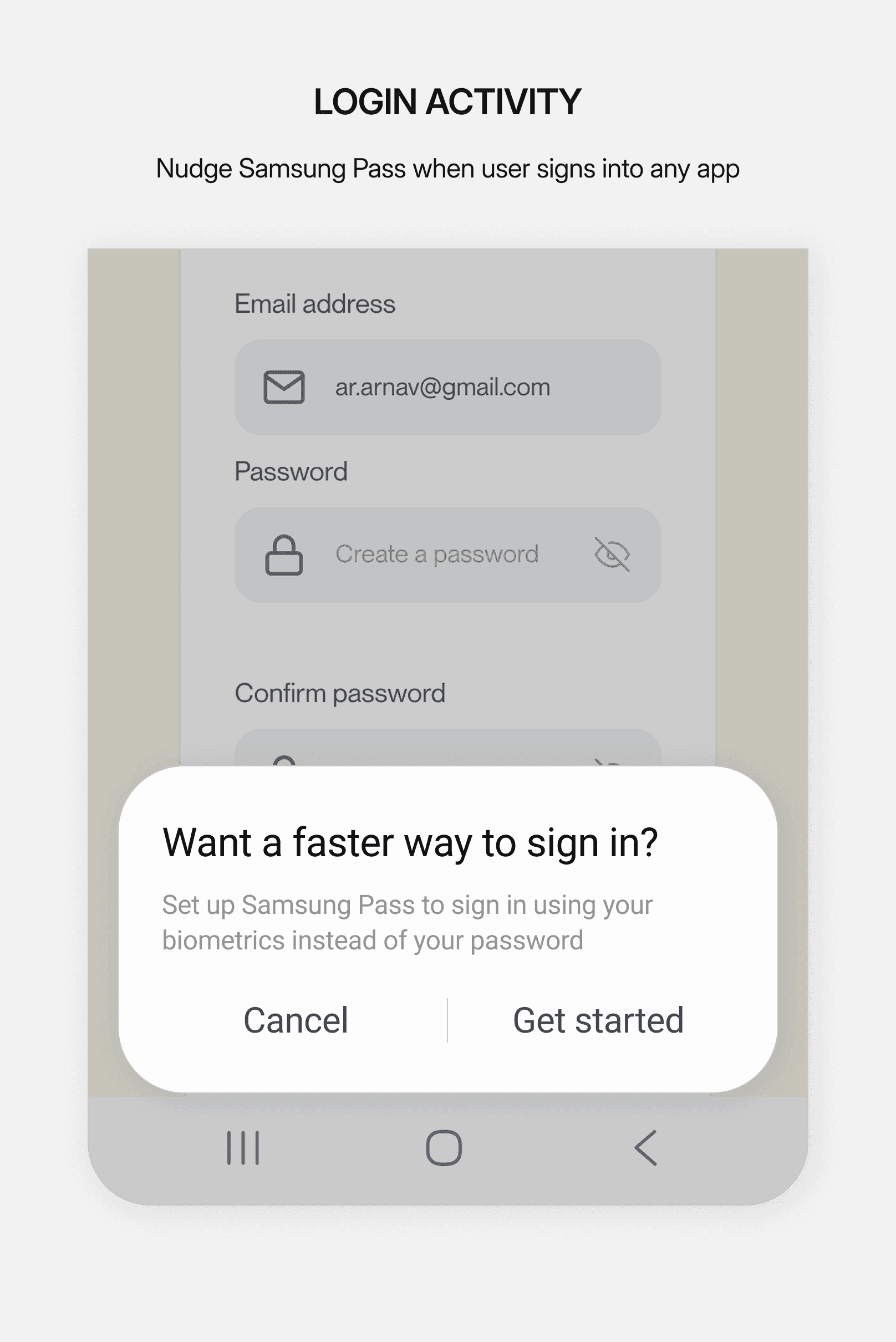
Samsung Account Registration increased by 11.8% globally through multiple solutions based on user research conducted in collaboration with an external research agency. Picked up as a separate project in the year 2022, with an objective to increase Samsung Account sign-up rate to 80% globally by 2023.

LACK OF BINDING FORCE
WHAT ACTUALLY SHIPPED
The strategy became a release portfolio, not one heroic feature.
INTERVENTION
PRIMARY JOB
DELIVERY
Dedicated place in Settings
Improve findability
SHIPPED · One UI 5.3
Consistent across PH & TAB
Improve recognition
SHIPPED · One UI 5.3
ON by default
Improve discoverability
SHIPPED · One UI 5.3
Real-time sync
Reduce repeated setup
SHIPPED · One UI 5.3
Consistent across SW & LP
Improve recognition
NEXT
Samsung account
Strengthen core
NEXT
OOBE prompt
Early feature education
NEXT
Proximity calm prompt
Experience value in context
NEXT
Contextual nudges
Experience value in context
NEXT
Consumption experience
Universal access to benefits
FUTURE
A platform-level change.
A foundation to build on.
Centralization is a foundation. A next iteration should help people understand what is ready, what needs attention, and how to recover. These are proposed improvements, not verified defects in the current product.
+6.7%
Reported global growth
in ecosystem users
The case study does not publish the measurement window, denominator, or causal attribution method. The figure is presented as a project-reported result.
Fragmentation can be a symptom of deeper organisational boundaries.
I stopped looking at fragmented experiences as isolated UX problems. Fragmentation can be a symptom of deeper boundaries between teams, platforms, technologies, and ownership models. My role as a designer is not always to remove those boundaries. It is to prevent users from having to understand them.
Learning 01
The hardest problems were organisational, not design related.
Ultimately bringing ecosystem settings into one place wasn’t about redesigning Settings, but about aligning experiences owned by different teams, technologies, and roadmaps. From this I learned that at platform scale, design is often most valuable in establishing a shared direction that independent teams can build toward.
Learning 02
Measure interventions, not just outcomes.
We saw ecosystem adoption grew after launch, but I would measure individual interventions more granularly from the start, like discoverability, ON by default states, and real-time sync separately. This would make it easier to see which decisions were actually changing user behavior.
Learning 03
Ship the foundation before solving the entire ecosystem.
We went further into more ambitious ideas around onboarding, contextual nudges, account integration and cross-device experiences. Solving all the problems at once would have been technically and organisationally risky. Having a common destination gave us a lower risk foundation to add future experiences on.
What initially appeared to be a navigation and discoverability problem was ultimately a systems problem.
Fourteen features five devices, four pillars
Before delving deep, we listed out Samsung Galaxy Ecosystem's 14 unique features working across 5 different productivity devices categorised into 4 major pillars, namely, Setup & Configure, Transfer, Continue, Control & Collaborate, in the year 2021.
14 features & iOS equivalents
Pillar
Feature
Description
iOS Counterpart
Setup & Configure
Easy Pair
Auto detection & pairing of Smart Watch & Buds to Phone or Tablet.
Instant Setup
Setup & Configure
Auto-Connect
Intelligent switching of Buds between Phone & Tablet.
Auto-Switch
Transfer
Quick Share
Share files with own or other devices.
Airdrop
Transfer
Copy Paste
Copy in one device, paste in other device.
Handoff
Continue
Call & Text on Other Devices
Receive or make calls as well as text messages from Phone, Tablet, Smart Watch, or Galaxybook.
Call Continuity, Message Continuity
Continue
Continue Apps on Other Devices
Continue ongoing calls, & browsing in Samsung Internet from Phone to Tablet & vice versa.
Handoff
Continue
Smart View
Play videos from Phone or Tablet to TV
AirPlay
Continue
Video Call Continuity
Allows user to continue video calls between Phone & Tablet using TP Google Duo.
Facetime
Control & Collaborate
Auto-Hotspot
Remotely turn on hotspot of one Samsung device from the other.
Instant Hotspot
Control & Collaborate
Samsung Dex
Allow user to use phone apps in a desktop like environment by projecting it to a TV.
-
Control & Collaborate
Second Screen
Tablet works as an extended display for Laptop when positioned next to it.
Sidecar
Control & Collaborate
Link to Windows
Allow Galaxy OS to connect with Windows.
-
Control & Collaborate
Smart Lock
Use Smart Watch to unlock your phone.
Auto Unlock
Control & Collaborate
Music Share
Guest can play music in a BT speaker through hosts phone without pairing.
Airplay
Documentation
Master rule table
Created a centralized spreadsheet to track ecosystem features and user testing results, helping keep evaluations consistent and making insights easier to find and share across the team. The sheet was regularly used by the tech team as a reference point during discussions and implementation, helping improve alignment between design and engineering and making collaboration smoother across workflows.

