
Growth
Platform UX
One UI 5.3-6
Making Samsung Account Worth Signing Into.
Reimagining a standalone signup flow into a system-level experience by surfacing account benefits in a user's day-to-day phone interactions.
+11%
+5.3%
1 B+
6
Executive Summary
The brief asked to increase signups.
The evidence pointed to a deeper problem.
Situation
Global signups had stalled at roughly 40% since 3 years, despite growing dependency of Galaxy experiences on Samsung Account.
Task
Identify why customers abandoned sign-in and create a scalable strategy to improve adoption across device lifecycle.
Action
Led UX research, reframed the problem, prioritised 25+ ideas and aligned teams in India and Korea.
Results
Multiple interventions were shipped globally, followed by an increase from ~40% to ~51% cumulative sign-in across platform.
My role
Senior Designer, IoT & Wearables
Core team
~15 across UX, research, product, engineering and leadership
Extended coalition
Legal, retail, marketing, business development, and product teams across India & South Korea.
My contributions
I owned, influenced, and delivered.
What I directly owned
Field research, problem framing and synthesis, insights & opportunity, experience principles, concept portfolio, prioritisation rationale, executive storytelling, and commercialisation.
What I influenced
Roadmap, cross-surface adoption strategy, regional-to-global translation and alignment between Bengaluru and Samsung HQ in Suwon.
What partner teams delivered
Production UI refinement, engineering implementation, analytics instrumentation, policy review and rollout through One UI release trains.
👉🏾
Case study in one sentence
Instead of solving just the signup flow, I created a broader adoption system. I provided independent One UI teams a shared strategy to ship through their own surfaces.
02 The real problem
An account nobody asked for.
Samsung Account was treated more as a registration funnel. Customers experienced it as additional demand for login credentials, after Google had already earned their trust and attention.
3 years
Registration remained near 40% from 2020–2023.
“Is Samsung Account
a Google Account?”
Research participant
The business needed an identity layer (an ID or Account) for both CRM and native apps & services. Users needed a reason to care.
The organisational tension
WHY LEADERSHIP CARED
Apps & Ecosystem
Samsung Apps & Services and Multi-device experiences depended on an identity layer customers were not adopting.
CRM Revenue
Legal changes to India’s IMEI database increased pressure on Samsung Account as a durable CRM channel.
Competitive
Apple ID registration was benchmarked near 60%; leadership set a 70% ambition for Samsung.
💬
Registration Rate of Samsung Account should reach 70% by end of 2023 to compete iOS.
Huichul Yang
Global Head of UX Team, Corporate VP
Samsung Head Quarter, Suwon, South Korea

The above diagram presents the "Better Together" task force including On-Device AI, IoT & Wearables, & Multi-Device Experience Teams, which further had majorly three departments, namely, the Tech, Product, & UX, which led multiple projects under the umbrella of "Better Together" initiative.
CONSTRAINTS
Platform
Android setup and Google came first; Samsung could not simply mandate another account.
Channel
Most A-series sales happened through retail environments, highly optimised for speed and hardware-centric pitches.
Scale
Any update in workflow had to work across markets, services and One UI release trains, NOT one local independent funnel.
Trust
Growth could not come at the cost of setup completion, consent clarity or repeated interruption.
🔍
Problem reframe
How might we earn signup by surfacing value at the moment it matters?
03 What we learned
We followed Samsung Account across the customer lifecycle.
Working with an external research partner, I led a mixed-method study across 60 participants, four Indian cities, Galaxy A-series owners, competitor devices and 25 retail locations.
01 · Analytics
Used Samsung Analytics to select markets, models, age group, gender, and the registration touch-points worth investigating.
02 · Field study
60 participants across four cities, six user personae, and three competitor OEMs.
03 · Retail reality
Shadowed purchase & onboarding journey disguised as a customer, and tapped sales behaviour across 25 Samsung and multi-brand stores.
04 · My leadership
Framed the study, guided a four-researcher partner team, led synthesis, and translated the findings into actionable roadmap decisions.
01
VALUE
People bought hardware, not native apps & services.
Camera, battery & storage drove purchase. Samsung services were rarely part of the retail story.
02
AWARENESS
Useful benefits were absent, or buried.
Find My Mobile, Secure Folder & Samsung Pass solved real needs, yet people rarely discovered them.
03
EXPERIENCE
Google arrived first. Samsung arrived when patience ran out.
Customers & retail staff were already skipping Samsung Account to finish a long setup journey during Onboarding.


Onboarding journey is stuffed with information overload, regardless of the OEMs. The key failure was not a single screen. It was timing, context and accumulated setup fatigue.


Multi-brand store-executives lacked formal training & incentives to pitch account benefits. ~90% sales occur here.
THE TURNING POINT
The brief asked me to design signup screen.
MY REFRAME
“Where can Samsung provide value before asking to signup?”
I used that question as a framework to go beyond designing onboarding flow to investigating entire lifecycle, and to bring the independent surface owners into one page.
04 The strategy
From one funnel to an adoption system.
I proposed 4 jobs across the lifecycle so no single screen had to do everything: make entry easy, reveal value in context, & create respectful ways to return.
01 · EMPHASIS
Make Signup Easy
Put the familiar Google sign-in route first, so people immediately recognize the quickest path.
02 · DISCOVERY
Show why it is useful
Show benefits such as device recovery, secure storage and syncing before asking people to signup.
03 · CONTEXT AWARE
Help when needed
Mention the account during a relevant task. E.g. When Gallery storage is nearly full, push cloud backup can help.
04 · RE-ENGAGEMENT
Let people return later
Allow users to skip during setup. Provide a respectful reminder when they have more time and context.
I used this framework as the decision filter for every concept, not merely as a way to organise the presentation.
HOW I MOVED THE STAKEHOLDERS & SYSTEM
Shipping across One UI needed more than just strong ideas with evidences.
01 · GLOBAL RELEVANCE
I translated the local insights into principles that global teams could use.
For example, the research was conducted with Indian A-series customers, but “people skip a second account when its value is unclear” is relevant across markets.
02 · REGULAR REVIEWS
I involved the decision-makers throughout the process since inception.
In a giant company like Samsung, enough exchange of notes is not a choice, but default. Stakeholders & decision-maker's early involvement reveals constraints and challenges assumptions beforehand.
03 · LOW-HANGING FIRST
I prioritised low-risk & low-hanging ideas first and pursue larger ideas for the next phase.
For example, replacing "skip" with “Remind me later” in the signup page could be launched relatively quickly. Other ideas required new infrastructure, legal review, or cooperation between several services.
04 · SHARED FRAMEWORK
I devised a framework relevant to multiple teams, not just UX. Each team had their shares.
Instead of just producing research & designing screens, I translated the findings to help multiple teams execute solutions with one strategy.

Early validation of ideas with store executives.
LEADERSHIP JUDGEMENT
Three tensions I had to resolve.
01
Customer trust over growth.
I rejected mandatory sign-in duirng OOBE.
Mandatory Signup during Onboarding could increase registration, while damaging trust. The strategy had to earn adoption rather than forcing. That could only be done through surfacing value.
02
Global relevance over regional urgency.
I identified what was local and what could scale globally.
Research in India discovered the problem, which I translated into behavioural insights that helped HQ make informed product decisions across the globe.
03
Fit 25+ ideas into Release trains
I turned ideation into a portfolio.
Low-hanging ideas were shipped first, foundational identity work stayed protected, and infrastructure-heavy concepts remained future bets.
25+ ideas · 4 directions · A sequenced portfolio.
I scored the ideas with product and engineering on user value, reach, effort, risk, global applicability & measurability, analysing trade-offs.

Affinity analysis of ideas conceived since inception categorised into three pillars value, experience, and awareness.
CONCEPT A · REJECTED
Mandate signup during OOBE
Make Samsung Account a required step during setup.
High reach, but incompatible with Android policy and likely to increase setup fatigue.
User value
Reach
Effort
Platform risk
HIGH
CONCEPT B · PARTLY SELECTED
Sell account benefits
Use retail campaigns, packaging and education to explain the account.
Promising in device, but difficult to execute across multi-brand stores and global markets.
User value
Reach
Effort
Platform risk
MEDIUM
CONCEPT C · SELECTED
Contextual value
Surface the right account benefit when the user comes across a relevant need.
Clear value, broad distribution and measurable behaviour, without blocking the user.
User value
Reach
Effort
Platform risk
LOW
CONCEPT D · FUTURE
Build new services
Create group sharing, alarms, Wi-Fi and camera experiences around the account.
Strong ecosystem vision, but dependent on privacy reviews, network effects and new infrastructure.
User value
Reach
Effort
Platform risk
HIGH
👉🏾
My recommendation
Show value contextually, pair it with low-hanging signup and recall ideas, and focus on simplifying the signup flow as a separate track.
IMPLEMENTATION STRATEGY
NOW
Launch low-hanging low-risk ideas.
NEXT
Simplify signup through OTP.
LATER
Invest in & validate ecosystem concepts.
Four patterns. One goal.
01 · EMPHASIS
Meet users where trust already exists.
Google sign-in moved to the top of the hierarchy. It reduced perceived effort and used a familiar identity path; without disguising the Samsung relationship.
Shipped One UI 5.3 MR


Direction · familiar Google identity as first decision point · forgot password copy · page title "sign in to get started" · "Remind me later"
CLOSER LOOK AT THE DECISION
Three ideas. One explicit trade-off.
Top three UI patterns for review. I recommended the options that made the lowest-effort path immediately visible while preserving Samsung’s native route. Google is moved first as it was already configured during Android setup with higher CTA engagement.
REJECTED
Over selling · Incompatible with GUI guidelines for next release trains.
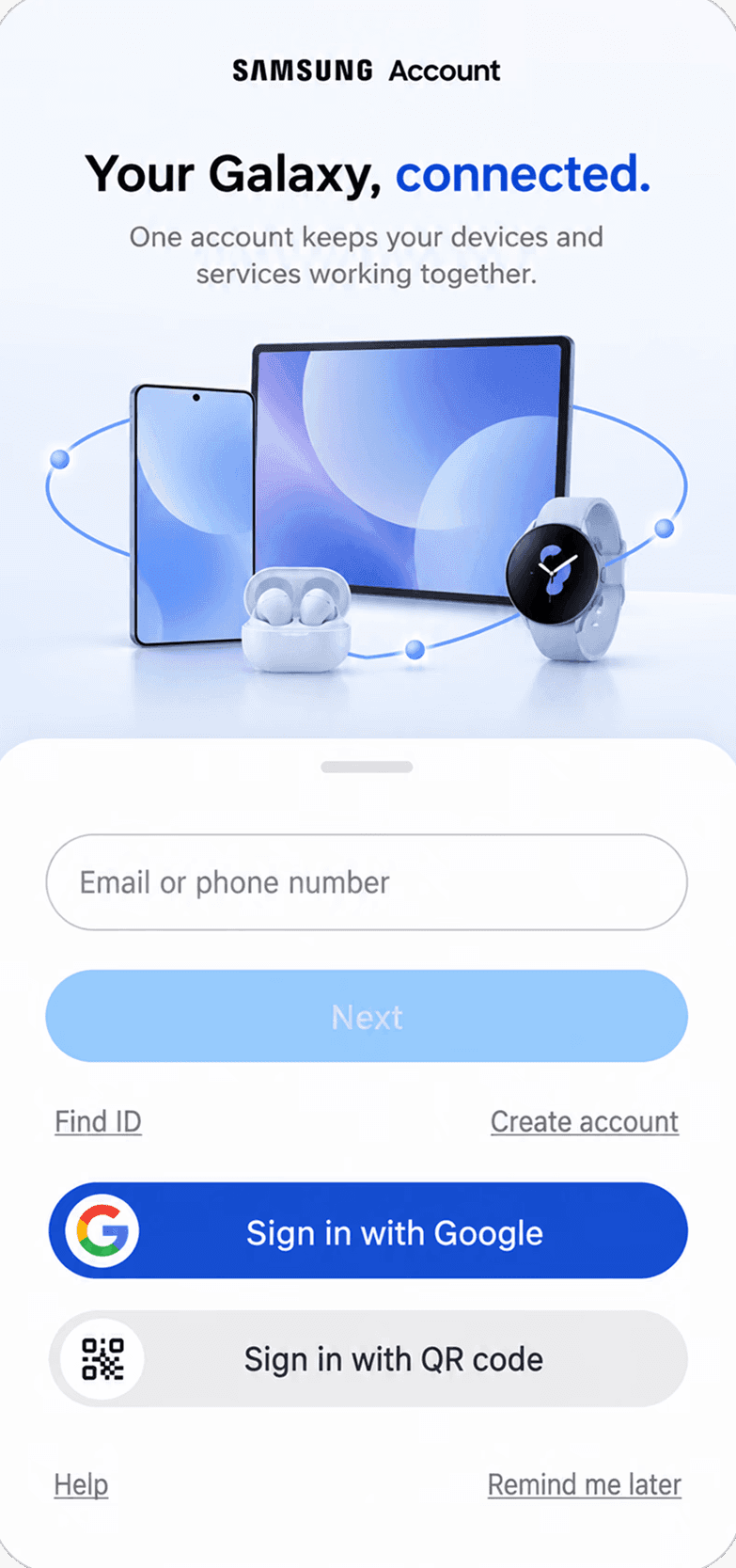
REJECTED
Incompatible with GUI guidelines for next release trains.

SELECTED
Re-use of GUI team's pre-tested assets · Alignment with Product team


Source: Re-visualized using GPT 5.5
Customer preferred multi-brand stores with "Setup your phone" kiosks during purchase
SHARED WITH EXTENDED COALITION


Better recall · Samsung Account part of packaging.
SHARED WITH EXTENDED COALITION
02 · RE-ENGAGEMENT
Replace a dead end with a respectful return path.
“Remind me later” acknowledged that setup is a poor time for communicating account benefits. Hence, "skip" is replaced with "Remind me later" to reserve the legal right to re-engage user with account benefits when users had more attention and better context.
Shipped One UI 5.3 MR

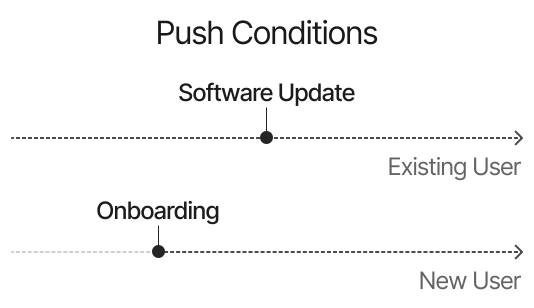
REJECTED
Incompatible with GUI guidelines.
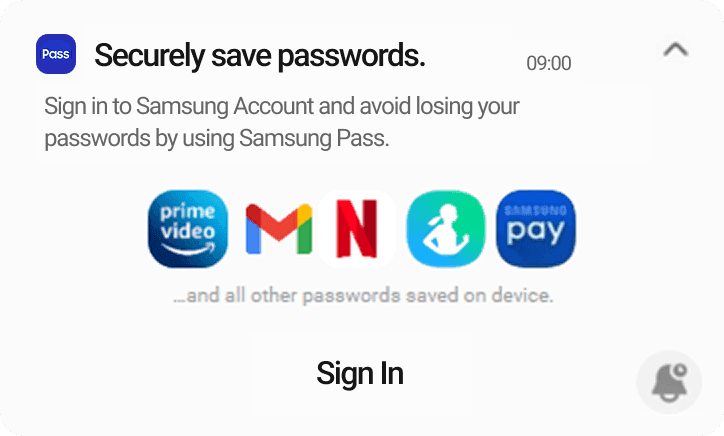
REJECTED
Incompatible with GUI guidelines.

REJECTED
Template needs multiple approvals.

SELECTED
Few approvals · Low hanging

Sticky notifications showcasing value offerings as a reminder.


In-use experience encountered half sheet pushes of Samsung Account Sign In as a respectful reminder.
Shipped One UI 5.3 MR
03 · DISCOVERY
Turn the phone into a value storefront.
How might we leverage various layers of phone to increase value discovery? This pattern involves passive discovery of value through app settings, widgets, and quick panel. This becomes the orientation layer.
Shipped One UI 5.3 · March 2023
WHERE SHOULD DISCOVERY LIVE IN THE SYSTEM?
PASSIVE DISCOVERY
Destination only?
Benefits are communicated in the individual Samsung Apps & Services for the high-intent users to discover on their own when needed.
NOT PREFERED
ACTIVE DISCOVERY
Nudge only?
Contextual or time-bound nudges reminding account benefits even to the low-intent users who would unlikely to discover the benefits on their own.
NOT PREFERED
HYBRID
Both?
Combination of both passive & active patterns to enhance feature discovery is the best way to ensure users convert.
PREFERED
DISCOVERY · SETTINGS APP
Visibility of touchpoint suffering from banner blindness.


REJECTED
Template needs multiple approvals.

REJECTED
Incompatible with GUI guidelines.

SELECTED
GUI alignment · Low hanging

Destination settings · communication of benefits in pre-signed in state
Shipped One UI 6
DISCOVERY · IN APP SETTINGS
Account based value in Notes, Gallery, My Files, Reminder & Internet.


GALLERY APP

MY FILES APP

REMINDER APP
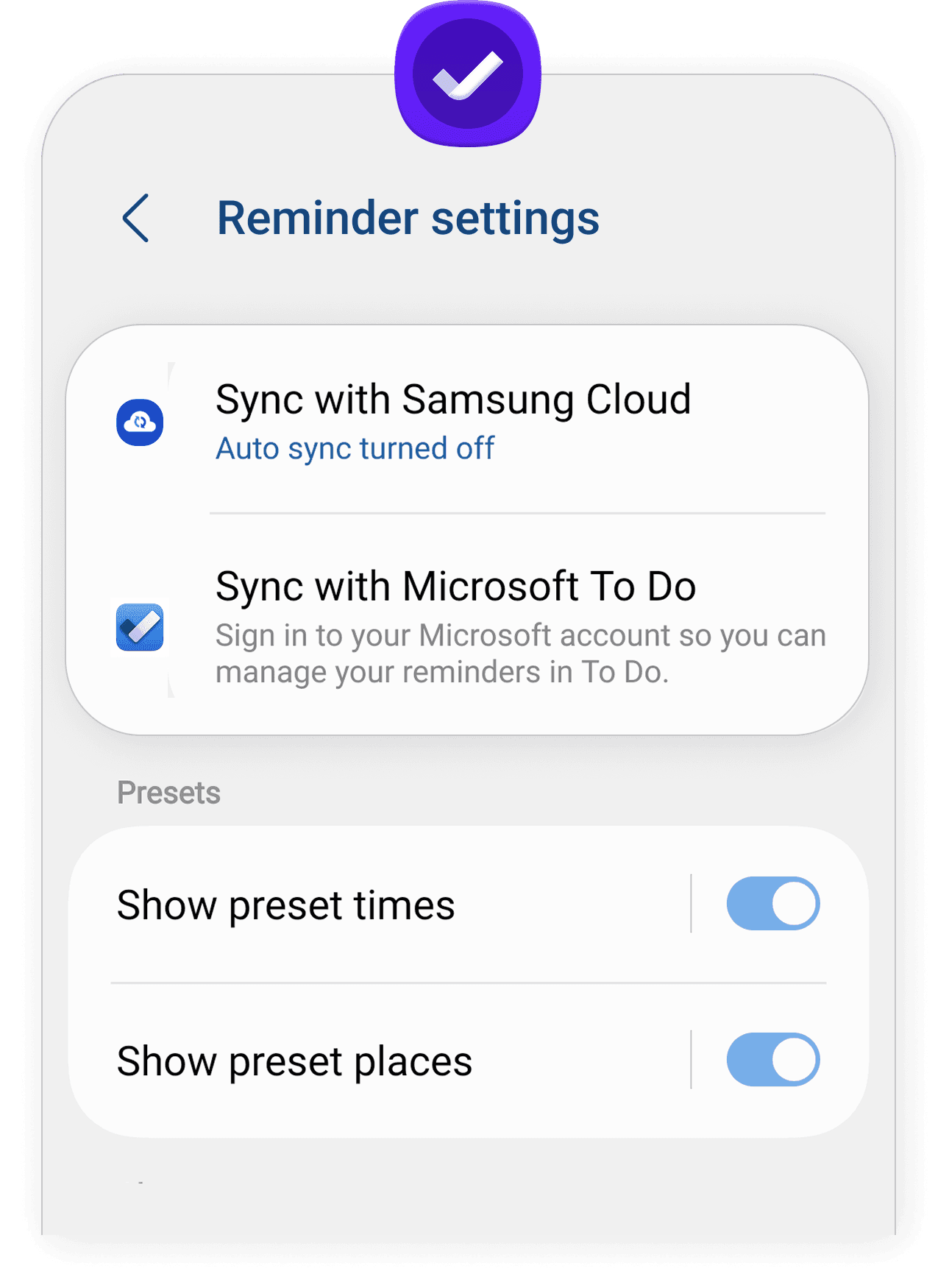
Destination In-app settings · presence of Samsung Account benefits where user intent is high
Shipped One UI 6
DISCOVERY · NATIVE APPS WITH ACCOUNT LINKING
Link Galaxy Store, Themes & Smart Switch with account.
BEFORE
No account mandate

AFTER
Sign up to browse, OR download apps.

SELECTED · GALAXY STORE · LOW HANGING
Shipped One UI 6
BEFORE
No account mandate

AFTER
Sign up to browse, download, OR buy themes.

SELECTED · THEMES APP · LOW HANGING
Shipped One UI 6
Mandate Sign up during transferring old data to new phone through Smart Switch App


REJECTED · SMART SWITCH APP · INAPPROPRIATE TIMING · D2D TECHNICALITIES
DISCOVERY · WIDGETS
Samsung health & One Drive sneak peek through Widgets


REJECTED
Not compliant with GUI team's guidelines for subsequent release trains.

REJECTED
Not compliant with GUI team's guidelines for subsequent release trains.

SELECTED
Aligned with Samsung Health Team's roadmap in compliance with GUI guidelines.

Widgets · Samsung health sneak peek through empty state of widgets
Shipped One UI 6


In-Widget marketing of value proposition in Empty State.
04 · CONTEXT AWARE
Explain the account inside the job to be done.
Gallery, My Files, Internet and other apps surfaced account-dependent benefits in context. These became the proof layer: “protect this” or “sync this,” not “create an account.”
Shipped One UI 5.3 · March 2023
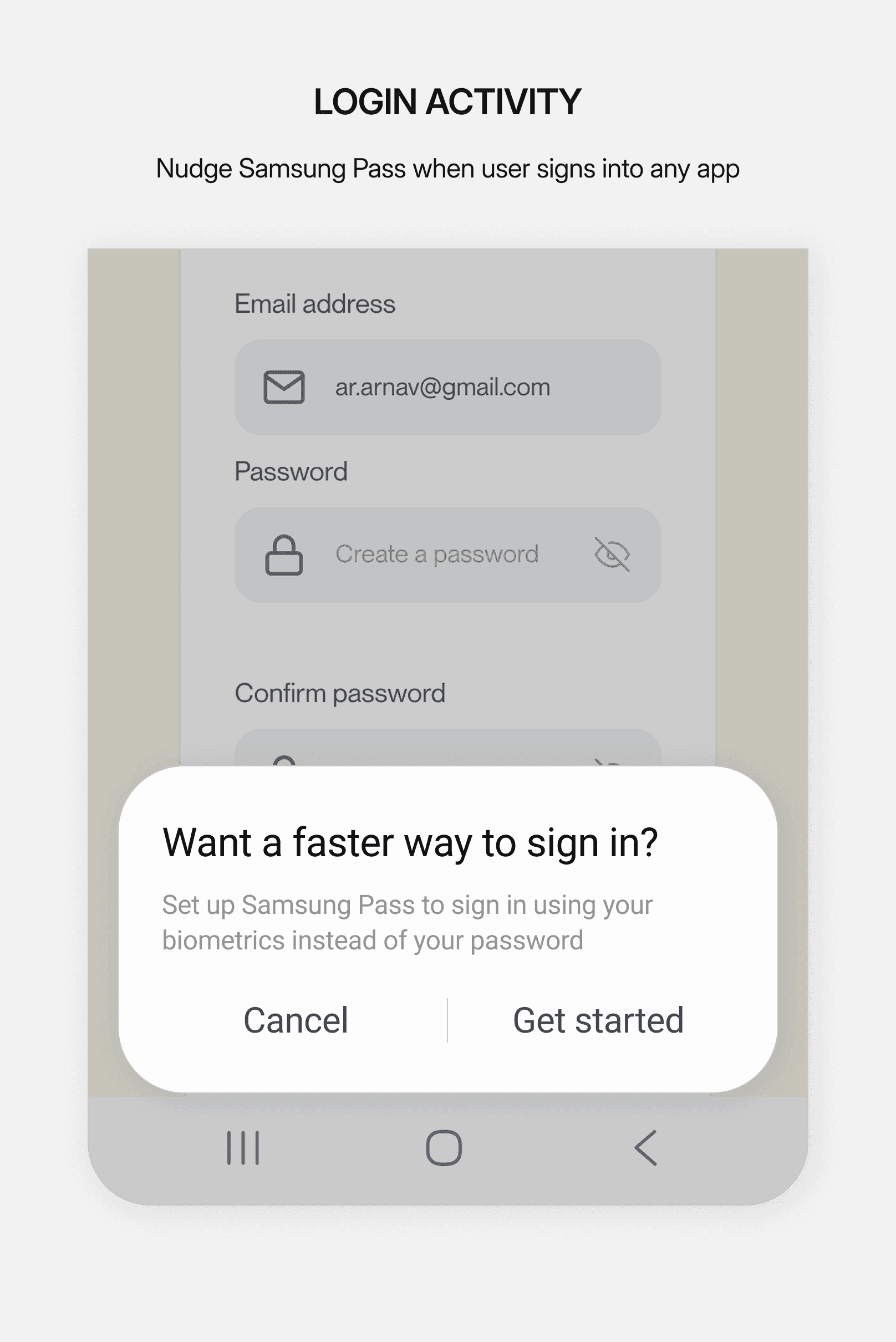

Push Samsung Pay when user exceeds 5 transactions on a day · Indefinite repetition

REJECTED · SAMSUNG PAY
Legal constraints on payment related topics
Push Cloud / One Drive backup when internal storage exceeds 90%.
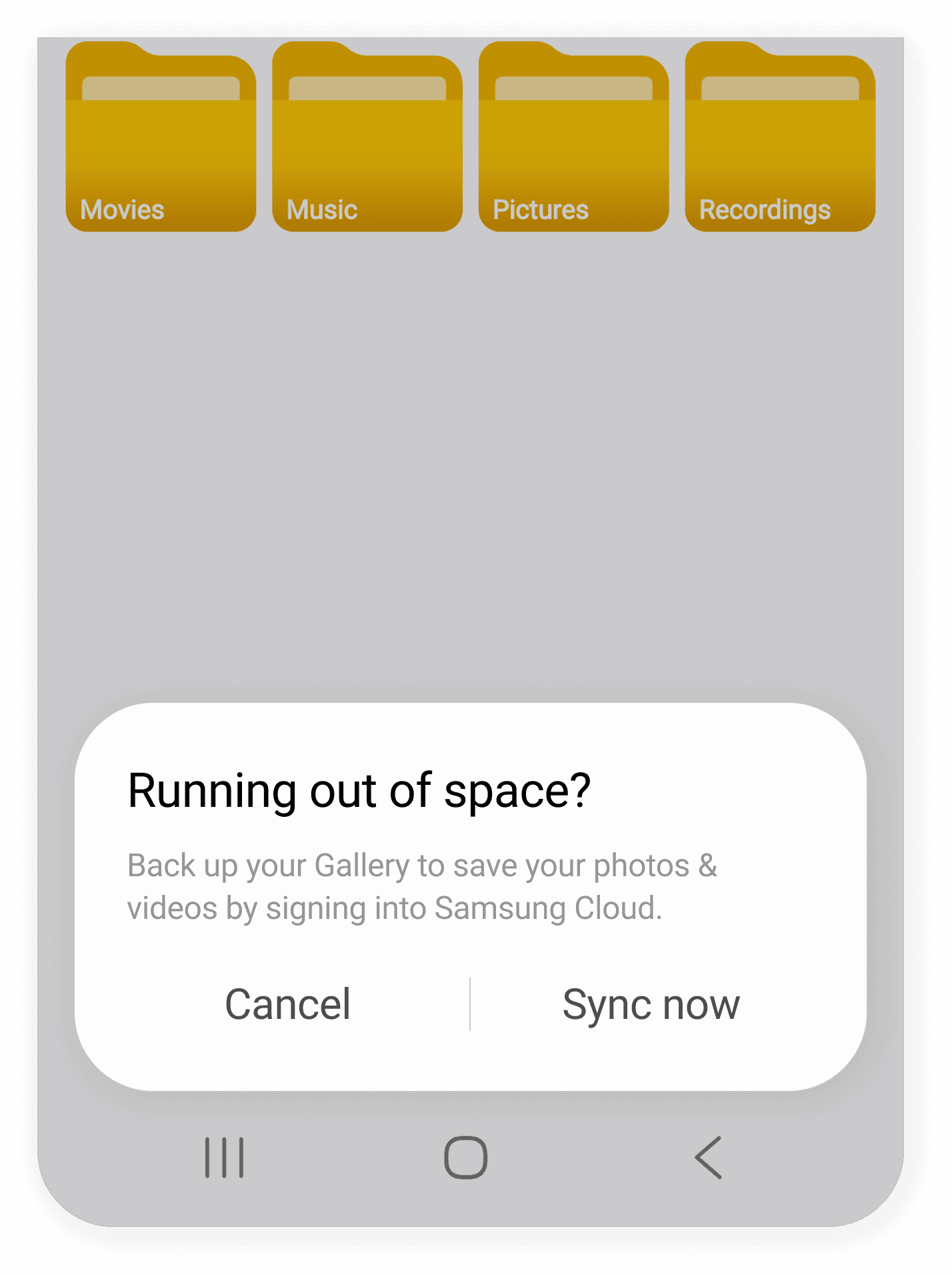
REJECTED · SAMSUNG CLOUD
Not fitting into Cloud Team's roadmap
Push Find My Mobile immediately on completing device setup post onboarding.

REJECTED · FMM NUDGE
Already part of Sticky Notifications.
Balancing non-intrusiveness yet actively pushed · nudged for universal activities
Shipped One UI 6
Setup
Settings
Moment of need
Value experienced
Account needed
WHAT ACTUALLY SHIPPED
The strategy became a release portfolio, not one heroic screen.
The four stories above show the system. This ledger separates the production interventions from the foundational work intentionally carried into the next phase.
INTERVENTION
PRIMARY JOB
DELIVERY
Google sign-up hierarchy
Reduce entry cost
SHIPPED · One UI 5.3 MR
Remind me later
Respect user timing
SHIPPED · One UI 5.3 MR
Half sheet signup
Create recall during use
SHIPPED · One UI 5.3 MR
Sticky notifications
Create recall after setup
SHIPPED · One UI 5.3 MR
Account visibility in Settings
Improve visibility
SHIPPED · One UI 6
In-app settings
Pitch at high intent moments
SHIPPED · One UI 6
Benefit-led signup
Explain value early
SHIPPED · One UI 6
Contextual nudges
Prove value in use
SHIPPED · One UI 6
Widgets
Sneak peek of value
SHIPPED · One UI 6
OTP based signup
Simplify account creation
WIP
Optimise account.com
Universal access to benefits
FUTURE
Discounted subscription
Third party ties for tailored UX
FUTURE
Increase cloud storage
Provide what user needs most
FUTURE
A measurable shift at global scale.
Following the One UI 5.3 and One UI 5.4 releases, Samsung Analytics recorded cumulative sign-in rising from approximately 40% to 51%. The business also reported a 5.3% increase in global CRM revenue across the initiative.
BEFORE
40%
AFTER
51%
BASELINE 2020-22
40%
Registration remained flat despite the growing value of Samsung services.
ONE UI 5.4 · MAR 2023
Familiar sign-in, benefit-led signup and post-setup reminders reduced dependence on one moment.
ONE UI 5.6 · OCT 2023
Reveal value in context
Settings and product surfaces made account-dependent benefits visible.
OBSERVED AFTER ROLLOUT
~51%
Cumulative sign-in increased across the combined intervention system.
The account was never the product.
The relationship was.
What I would do differently?
Track each intervention separately to understand what actually drove adoption.
We should have set up better tracking from the beginning, so we could tell which design change actually improved Samsung Account adoption.
What this changed in my practice?
Adoption works best when users see the value, not when they’re repeatedly pushed to sign in.
People should opt for sign in because they understand the value of a Samsung Account, not because we keep nudging them.
Designing Samsung Account meant designing the relationship between Samsung and its customers.
Problem statement
Samsung Account's Global Signup Rate stopped at 40% for 3 consecutive years from 2020 to 2023.
PRIMARY
Stagnant Rate
Samsung has been releasing multiple features including multi-device ecosystem, that runs mostly through Samsung Account. Low Signup rate in Samsung Account directly impacts their adoption.

SECONDARY
CRM Pressure
In early 2023, India’s IMEI database purge impacted Samsung’s CRM activities. This increased the importance of Samsung Account as a key customer engagement channel.
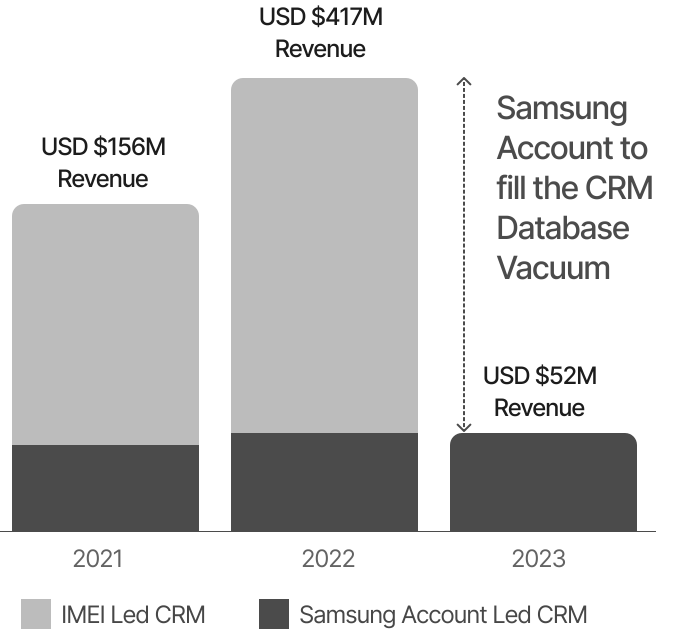
TERTIARY
Rivalry Pressure
Back in 2022, Apple Phones were almost double with 60% registration rate, posing a tough competition to Samsung Account.

5 Priority Projects
The "Better Together" task force identified 5 different large scale projects as listed below.
PROJECT 1
Increasing Samsung Account Registration Rate
PROJECT 2
Unified Configuration & Management of Galaxy Devices
PROJECT 3
Managing Samsung Devices through Smart Things
PROJECT 4
TV Centric Multi-Device Experiences
PROJECT 5
Improving Basic Experiences
In a nutshell, it is a Design Thinking Model.
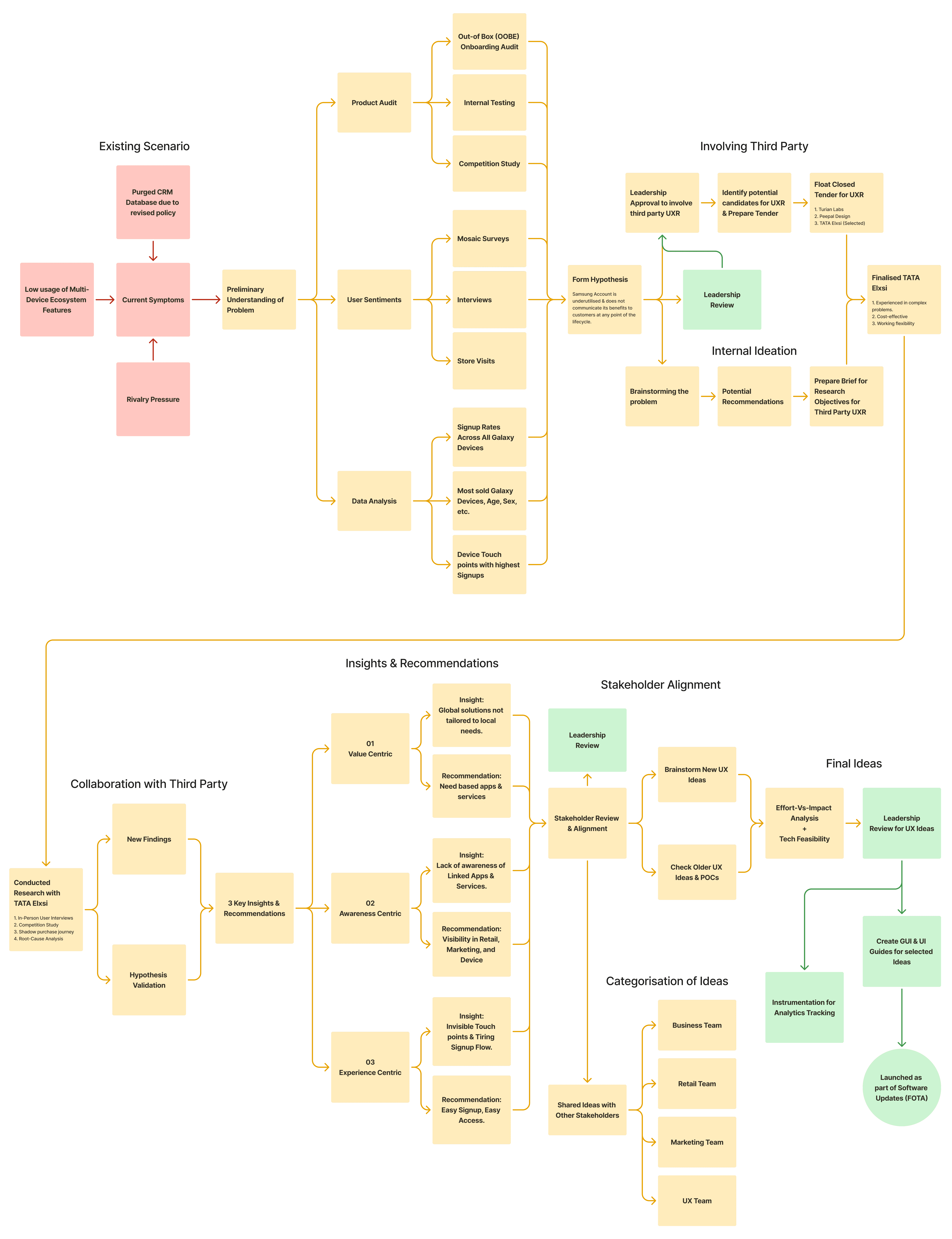
The above diagram presents the workflow, approach, & methods used for the project of "Increasing Samsung Account Registration Rate", and how a complex version of Design Thinking Model was applied due the influence of its scale & involvement of multiple stakeholders.
Sampling & Recruitment
Devised a robust research plan to conduct bias-free UXR to validate preliminary hypothesis.


Selected two Tier-1, and two Tier-2 cities for randomising outcomes.
Selected the popular A-Series Galaxy Phone, as per Data Analytics.
Selected three Personae, namely, an iOS user, a Samsung Flagship Phone user, and A-Series model user.
Selected age group between 18-54 years old with 1:1 male & female ratio.

Led UXR to in collaboration with a competent & experienced External Agency, TATA Elxsi.

4 cities (Tier-1 & 2) chosen based on analytics & agency's presence.
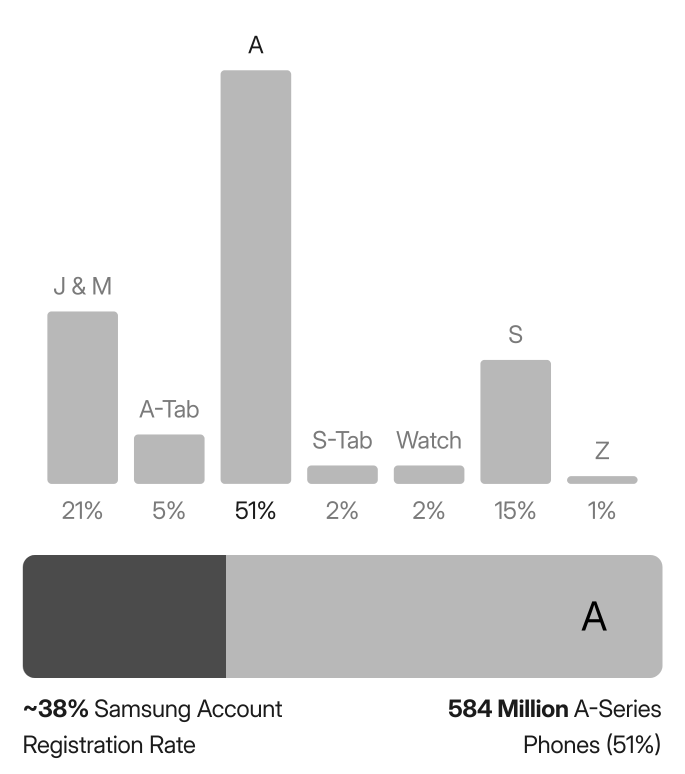
A-Series Model is selected because it had highest sales.

Age 18-54, Working, Tier 1 or 2 City Resident, 1:1 Male Female

Analytics highlights which touchpoints lead to Registration

1 experience center · 12 Samsung cafe's · 12 Multi-brand stores
🤔
Users are either not aware or do not find value in Apps & Services.
Preliminary Interpretation
SRIB UX Team
INSIGHTS
01 · Lacking Real Value
Linked Apps & Services do not meet real user needs.
None of the interviewed users had Samsung Ecosystem, nor they used SmartThings or Bixby, but Third Party Apps due to their relevance in their daily lives. Samsung Apps & Services either lack competitive edge OR they DO NOT meet the needs. On top of that, users are comfortable with services which their friends & family use, like, Google Pay instead of Samsung Pay, Google Drive instead of MS One Drive, and so on.
02 · Hardware over Apps
Folding Screen, IP Rating, Camera, etc. are priorities.
90% sales are generated by Retail, and unfortunately Store Executive's sales pitch is designed on hardware because customers enquire about camera zoom quality, battery life, storage, display, etc. A lost opportunity for Samsung Account during purchase journey at the store.
03 · Not a Closed Garden
Android limits mandating Samsung Account.
Due to rigid Android policies, Samsung account does not reserve the right to mandate registration for any fundamental actions taken by the users unlike iOS. For example, Samsung has no control over the Onboarding Wizard, nor Samsung can mandate Galaxystore to download Samsung Apps, the way Google PlayStore mandates App downloads.
04 · Absent or Buried Benefits
Benefits are Absent, if not Buried.
The device does not communicate the benefits of Linked Apps & Services while in use. Hence, most users never discover these services in their lifecycle. For example, Linked Apps & Services like Find My Mobile, Samsung Pass, & Secure Folder are highly valuable, but because there isn't any communication established with the user that such services are present, users end up not using Samsung to its fullest.
05 · Absent in Stores
Neither Store nor FSMs care about Apps & Services.
FSMs have daily sales target in a multi-brand store, haphazardly skipping account related benefits. While Retail owns 90% of sales, 70% of that are owned by multi-brand stores. While sales is a success through these third party stores, it comes with the cost of not being able to transfer enough information on Linked Apps & Services. The reasons behind this is most FSMs are not trained by Samsung, and they rush to meet the daily sales limit, skipping the Onboarding Screens as fast as possible.
06 · Dull Touchpoints
Low CTR on Signup touch points
Onboarding (OOBE) is the first thing an excited customer deals with while unboxing the new phone. Based on usability study, it is found that users tend to skip steps wherever possible to avoid decision fatigue. In addition to that, One UI Onboarding Flow is placed towards the end after Android Onboarding Flow. By that time, customers reach peak frustration already.
All Ideas
Collating all ideas conceived since inception, while conducting user interviews, usability testing, data analysis.
Intent
Enquiry & Purchase
Onboard
In-Use

Adoption-Frequency Matrix
Analysing which ideas are likely be used frequently by the majority of the users.

